
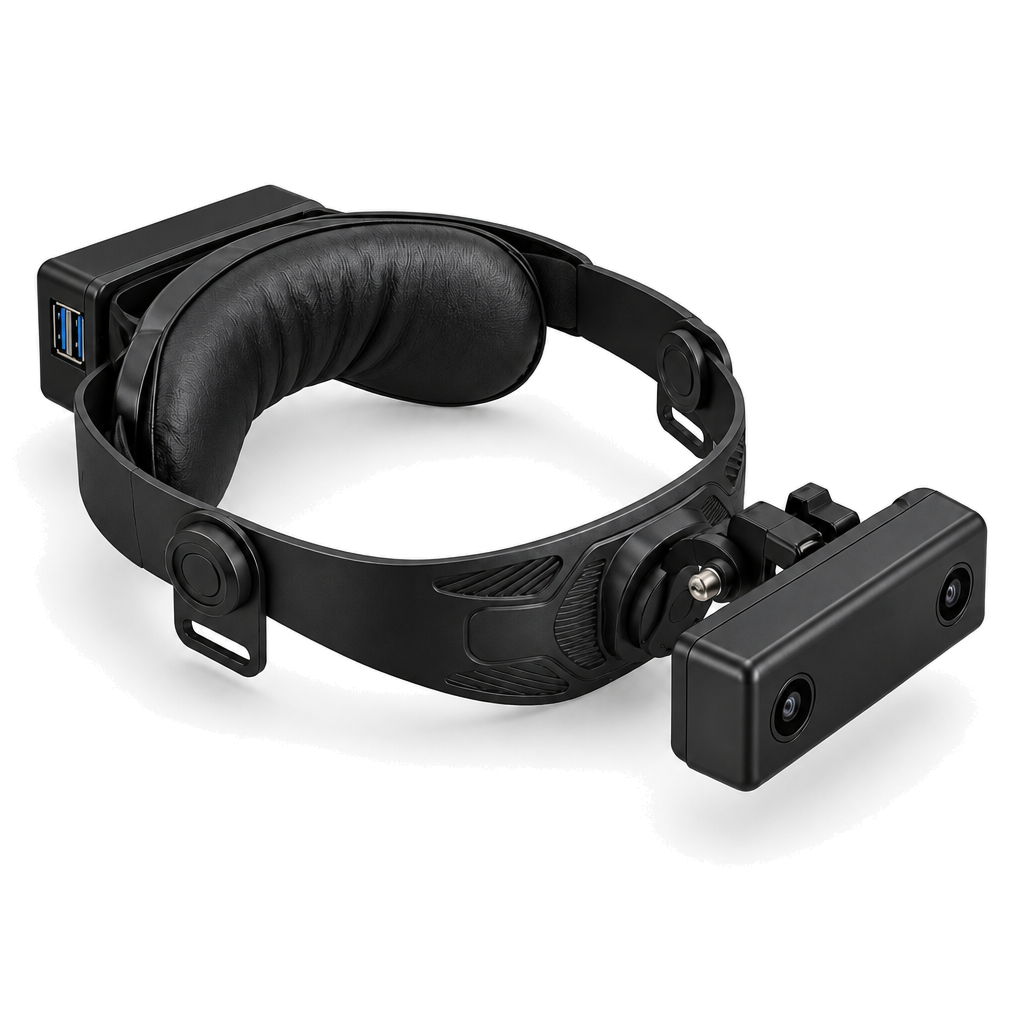
Ego Duo X1 Pro

A head-mounted system for egocentric manipulation data, combining an integrated stereo camera, a WeChat Mini Program, and a data platform. It records stereo video and timestamped IMU data for bare-hand tasks or project-configured dual-gripper capture.

Ego Duo X1 Pro wearable stereo camera with an adjustable headband and rear compute enclosure

Specifications

ItemEgo Duo X1 Pro Specifications and Configuration
Camera ModuleIntegrated stereo camera with stereo image sensors and an IMU.
Image SensorsAR0234 color CMOS sensors with global shutter, specified lenses, and a carrier PCB; approximately 2.3 megapixels per camera.
LensesWide-angle, fixed-focal-length lenses for both cameras.
Per-Camera Field of ViewHorizontal: 165°; vertical: 108°; diagonal: 189°.
Combined Stereo Field of ViewHorizontal: ≥170°; vertical: 108°.
Video OutputSingle stereo video stream: 4000 × 1200 px transmitted frame, with an effective image area of 1920 × 1200 px per camera.
Video ModesH.265: 60 or 30 fps; MJPEG: 30 fps; YUYV: 30 fps.
IMUIntegrated TDK InvenSense ICM-42688-P six-axis IMU sampling: 600 Hz at 60 fps video; 300 Hz at 30 fps video. Outputs three-axis acceleration, three-axis angular velocity, and sample timestamps.
SynchronizationLeft/right sync error: ≤10 μs; camera–IMU timestamp alignment error: ≤10 μs.
Compute ModuleCompanion edge computing board with an octa-core Cortex-A55 CPU, a 10 TOPS BPU, and 4 GB RAM.
Local Storage128 GB microSD card rated A2 and V30, plus a separate 32 GB microSD card rated A1 and V10 for the operating system.
Power and CoolingPortable power bank; heat sink and cooling fan.
Camera InterfaceUSB 3.0 SuperSpeed with a Type-C connector.
Audio ProvisionProvision for a microphone connection; equipped with a loudspeaker for spoken task announcements.
Mechanical LayoutFront vision, adjustable headband, and rear housing; brackets and cables.

SAMPLE VIDEOS

Sample Scenes

SCENE / 01

Small Component Bagging and Boxing

Place the loose black components on the table into silver packaging bags in batches, pinch each bag opening closed, and then place the filled bags into the cardboard box one by one and arrange them neatly. After packing, move the box to the center of the table, close the lid, and position it neatly and securely.

Left Camera · Front LeftClick to play
Right Camera · Front RightClick to play
Auto-labeling · AutoLabelClick to play
Hand Pose · HandposeClick to play

Source Data

The complete ZIP contains left and right camera videos, auto-labeling and hand-pose videos, per-frame timestamps, IMU samples, camera calibration, metadata, and the manifest. See the details below for the data format guide.

View details
  • Manifest.json
  • MetaData/metadata.json
  • head/AutoLabel/annotated_zh.mp4
  • head/Calibration/extrinsics/camera_camera_extrinsics.json
  • head/Calibration/extrinsics/camera_imu_extrinsics.json
  • head/Calibration/rgb-front-left/intrinsic.json
  • head/Calibration/rgb-front-right/intrinsic.json
  • head/ColorRGB/front_left/timestamps.csv
  • head/ColorRGB/front_left/video.mp4
  • head/ColorRGB/front_right/timestamps.csv
  • head/ColorRGB/front_right/video.mp4
  • head/Handpose/handpose.mp4
  • head/IMU/imu.csv
SCENE / 02

Folding and Neatly Arranging Clothes

Unfold and lay flat the yellow T-shirt, blue T-shirt, and black hooded jacket in sequence. Arrange the sleeves and hood, then fold each garment into a compact, neat rectangle. When finished, place the yellow and blue T-shirts on the right side of the table and the black jacket on the left.

Left Camera · Front LeftClick to play
Right Camera · Front RightClick to play
Auto-labeling · AutoLabelClick to play
Hand Pose · HandPoseClick to play

Source Data

The complete ZIP contains left and right camera videos, auto-labeling and hand-pose videos, per-frame timestamps, IMU samples, camera calibration, metadata, and the manifest. See the details below for the data format guide.

View details
  • Manifest.json
  • MetaData/metadata.json
  • head/AutoLabel/annotated_zh.mp4
  • head/Calibration/extrinsics/camera_camera_extrinsics.json
  • head/Calibration/extrinsics/camera_imu_extrinsics.json
  • head/Calibration/rgb-front-left/intrinsic.json
  • head/Calibration/rgb-front-right/intrinsic.json
  • head/ColorRGB/front_left/timestamps.csv
  • head/ColorRGB/front_left/video.mp4
  • head/ColorRGB/front_right/timestamps.csv
  • head/ColorRGB/front_right/video.mp4
  • head/HandPose/handpose.mp4
  • head/IMU/imu.csv

Stereo Vision and IMU Data Format Guide

For all samples · Document version 1.4

Stereo Vision and IMU Data Format Guide

Normalized capture package

Document version 1.4

1 Overview and Directory Structure

The package organizes stereo images, per-frame timestamps, six-axis inertial measurements, calibration parameters, and capture metadata. Manifest.json is the entry point linking streams, clock domains, coordinate frames, and files.

package-root/
  Manifest.json
  MetaData/metadata.json
  head/ColorRGB/front_left/video.mp4
  head/ColorRGB/front_left/timestamps.csv
  head/ColorRGB/front_right/video.mp4
  head/ColorRGB/front_right/timestamps.csv
  head/IMU/imu.csv
  head/Calibration/...

2 Package Manifest

Manifest.json describes the three sensor streams, referenced files, clocks, coordinate frames, calibration files, metadata, and storage location. Referenced files carry a relative path, role, SHA-256 digest, and serialization profile where applicable.

3 Data Streams

The package contains left and right ColorRGB streams plus one IMU stream. Each stream declares its sensor, member, coordinate frame, clock domain, row schema, nominal rate, observed record count, timestamp range, and file references.

4 Video Index and IMU Samples

Each MP4 video has a timestamps.csv file with frame_index,timestamp_ns,pts. The IMU file uses timestamp_ns,ax,ay,az,gx,gy,gz. Timestamps are read as int64 nanoseconds; six-axis measurements are finite float64 values.

5 Camera Intrinsics

Each camera has an intrinsic.json file containing the sensor and frame identifiers, image size, pinhole projection parameters, equidistant distortion parameters, pixel convention, and calibration version.

6 Coordinate Frames and Extrinsics

The IMU uses a forward-left-up frame and the cameras use optical right-down-forward frames. Extrinsic files store static source-to-target transforms as unit quaternions and translation vectors in meters.

7 Clocks and Time Synchronization

Both cameras and the IMU share the head hardware clock. Camera pairs use matching frame indices and hardware timestamps. IMU samples are selected and interpolated around image timestamps; no additional time offset is applied.

8 Capture Metadata and Storage

MetaData/metadata.json records source identity, tenant and unit identifiers, clock domain, capture time range, software versions, and device associations. Manifest.storage records the delivery profile, allocation, and storage reference.